


The Economist - World News
4.91.75K Reviews
App Specs
- Version
- 4.101.0
- Updated On
- License
- Free
- Downloads
- 1,000,000+
- Developer
- The Economist Newspaper
- Categories
- News & Magazines
- Platform
- Android, iOS
Screenshots
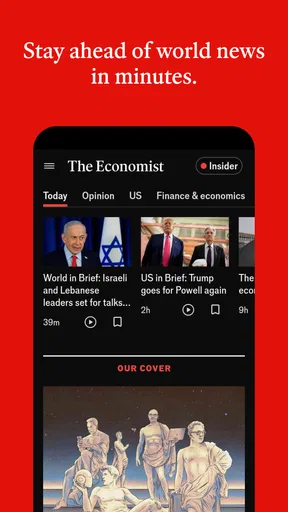
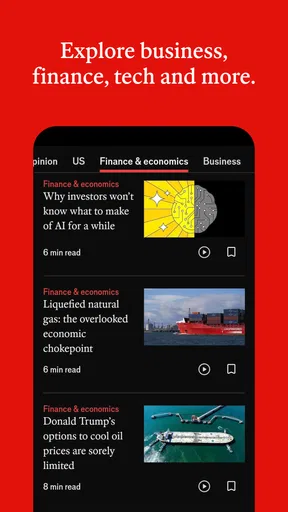
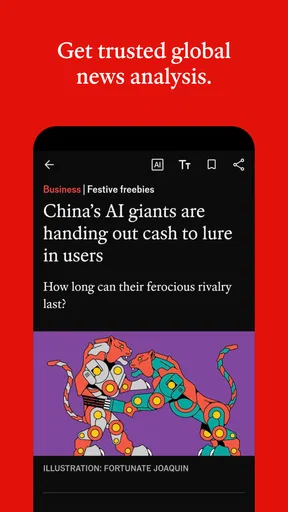

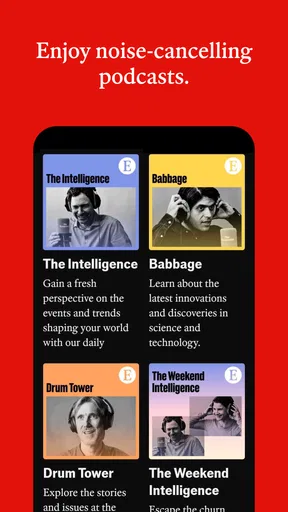

 Analysis by AppCompare
Before I decide whether a news app deserves a place on my phone, I ask two separate questions: do I find its reporting useful, and do I understand the choices I’m making when I use it? Those questions matter especially with a publication built around international affairs and analysis. I’ve been using The Economist - World News as a way to follow events beyond quick headlines, and I find its strongest appeal is the space it gives readers to think through why a story matters. It is not the only way to keep up with the news, and its paid content means it will not suit every reader, but it can be a worthwhile companion when context matters more to you than sheer volume.
What a trust-minded reader should look for
News reading can involve more than opening an article: it may include signing in, deciding what to save, choosing whether to receive alerts, or paying for access. I don’t treat a polished interface as proof of good privacy practices, nor do I assume that a familiar publisher answers every question about account or data handling. I focus instead on the choices I can see and control while using an app. That is a sensible habit here, too: consider which account details you share, whether you want notifications, and what you choose to keep in a personal reading list.
The app is published by The Economist Newspaper and sits in the news and magazines category. It has a 4.9 average from around 80,000 ratings, and more than a million installs. Those figures suggest a sizeable readership, but they don’t tell me whether its style or approach is right for a particular person. I would judge that by reading a few pieces and asking whether the reporting helps me understand a subject, rather than treating popularity as a guarantee of fit.
Where it fits into a daily routine
For me, the most useful way to approach a publication like this is to give it a defined job. Instead of opening it whenever I have a spare moment and hoping to absorb everything, I would use it to follow a handful of subjects that affect my work, studies, or interests. A reader tracking an election, an economic shift, or a technology debate can use a longer analysis to build context, then turn to faster-moving news sources when they need immediate updates. The Economist is more valuable as a way to interpret developments than as a substitute for every kind of news service.
A practical routine might look like this: over breakfast, I check the day’s coverage and choose one story that seems likely to matter beyond the morning. Later, when I have a longer break, I read that piece carefully and save it if I want to revisit its argument. If I’m commuting without reliable service, offline reading can make that plan more dependable. The trade-off is that saving something creates another small responsibility: I need to return to it, or my saved material becomes a pile of intentions rather than a useful reading queue.
Useful choices—and the limits of what they tell you
Visible options such as saved articles, reading lists, and notifications can make a news habit more deliberate. I’d start with a short list of subjects rather than turning on alerts for everything that catches my eye. That helps keep a phone from becoming a stream of interruptions, while still making it easier to return to a topic when I have time. These are practical choices about how I use the app; they should not be mistaken for evidence about broader data practices or a promise about what information an account may involve.
If you are considering an account or a subscription, pause at the point where the app asks you to make that decision and read the terms presented there. The app is free to install, but it offers in-app purchases ranging from $6.90 to $289.00 per item, so access can involve more than simply downloading it. I would first work out how often I expect to read and whether the material I want is available to me, then decide whether paid access makes sense. If I only want occasional headlines, paying for a deeper reading experience may be unnecessary.
Worth Reading Before You Choose

Flipboard Shows What News Apps Must Do Beyond the Feed

Switching to Android Auto Means Rethinking Your Driving Routine

Google Calendar Makes a Crowded Week Easier to Manage

Ludo King Makes the Most of the Minutes Between Plans

Baby Panda World Brings Quick Play to Modern Phones, but Its Game Library Feels Busy

ESPN’s Live Game View Makes Following Close Games Easier
There is also a useful distinction between a notification and a reading plan. An alert can point me toward something timely, but it cannot tell me whether I have enough attention to assess it properly. When a topic is sensitive or moving quickly, I prefer to open the story when I can read with care, then compare its account with other reporting if I need a broader view. That approach makes the app one part of my news routine, not the sole authority I rely on.
Who is likely to appreciate it
I’d recommend giving it a try if you enjoy international reporting, want to understand the forces behind current events, or regularly need considered analysis for work or study. The writing and breadth can reward readers who are willing to spend more than a few seconds on a story. It may also suit someone who wants one publication to return to throughout the week rather than hopping between a large number of headline feeds.
On the other hand, I would steer away from it if your main need is a rapid, highly local stream of alerts, a broad mix of short updates, or a news experience that costs nothing beyond installation. A public broadcaster, a local outlet, or a general news aggregator may be a better everyday fit for those needs. Readers who prefer reporting with a different editorial voice should also compare a few publications rather than assume that one source’s analysis will match their expectations.
First Impressions: Sleek and Simple
When I first opened the app, I was struck by its clean and intuitive design. No clutter, just a straightforward interface that puts the news front and center. It’s like walking into a well-organized library where every book is a best-seller. You get this immediate sense of professionalism which is kind of what you'd expect from The Economist.
Features That Stand Out
So, let’s talk features. What really impressed me was how comprehensive the coverage is. The Economist - World News isn’t just about economics; it’s a full buffet of topics. Politics, science, technology, culture—you name it, they’ve got it. The app is updated with new content regularly, so you’re always in the loop.
- Daily Briefings: These are perfect for those mornings when you’re sipping coffee and want a quick catch-up. They’re concise yet informative.
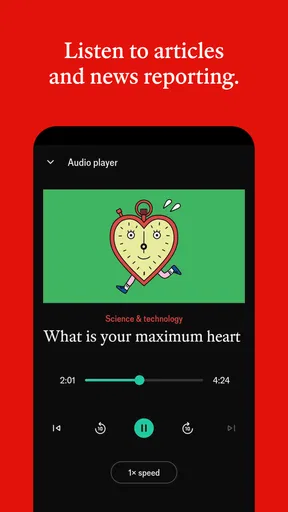
- Audio Editions: If you’re a multitasker like me, you’ll love this. Listen to articles while you’re on the go. It’s like having a podcast and a news app rolled into one.
- Offline Reading: This is a lifesaver for those commutes when your signal’s spotty. Download articles and read them anytime, anywhere.
Diving Deeper: Analysis and Opinion
What sets this app apart is the depth of analysis. It’s not just news; it’s a deep dive into the why and how. The opinion pieces are particularly engaging, offering perspectives that challenge and enrich your own understanding of global events. Plus, the writing style is top-notch—crisp, clear, and occasionally witty. It’s like having a conversation with a very informed friend.
That depth is also the main trade-off. If I need to know whether a local service is disrupted right now, or want a fast sequence of brief updates, a specialist local source or a live news feed will probably answer faster. I reach for this app when I want to follow the reasoning around a development, not when every minute counts. For a complicated issue, I also find it useful to separate the article’s reporting from its interpretation: understanding the argument is valuable, while checking other perspectives helps me avoid mistaking one publication’s framing for the whole picture.
Customizing Your Experience
One of the cool things about The Economist - World News app is how you can tailor it to your interests. You can save articles, create reading lists, and even set notifications for topics you’re particularly keen on. It’s all about making the news work for you, rather than the other way around.
A small habit makes those options more useful: I would keep a reading list organized around a question rather than saving every article that looks interesting. For example, if I’m trying to understand a policy change, I can collect a few relevant pieces together and return to them when I have time. I’d also review my notification choices after a week. If alerts are interrupting more than they help, narrowing them is better than abandoning the app altogether.
Room for Improvement?
While I’m all praises, no app is perfect, right? One thing I noticed is that some features are locked behind a paywall. To access the full spectrum of content, you’ll need a subscription. But hey, for the quality of content you’re getting, it’s worth considering if you’re serious about staying informed.
Another point is the occasional lag when loading heavy content. It’s not a deal-breaker but something to keep in mind if you’re using an older device.
Cost is worth considering before I build a habit around the app. The purchase range runs from $6.90 to $289.00 per item, so I would check what each option provides and how it fits my reading needs rather than assume a single price or plan. If I only open the app now and then, free access and other news sources may be enough. If I routinely read its analysis, paying could feel more reasonable—but that depends on my own budget and how much I use it.
The app is rated Teen, and its current version is 4.75.0, with a minimum operating-system requirement of 10. I’d check that my device meets the requirement before downloading, especially if I keep an older phone in service. For anyone who shares a device or account, it is also worth thinking about who can see saved reading choices and notifications on that screen; simple device-level privacy habits matter when news interests are personal.
Wrapping It Up
At the end of the day, The Economist - World News app is a powerhouse for anyone who values quality journalism. Its comprehensive coverage and insightful analysis make it a must-have for news aficionados. Sure, there’s that subscription fee, but think of it as an investment in staying informed.
So, if you’re ready to dive into the world of international affairs with a touch of sophistication, give this app a spin. You might just find yourself a little smarter, a little more informed, and hey, that’s never a bad thing, right?
A cautious way to decide
I would try it with a clear purpose: choose a topic I genuinely want to understand, read a few pieces, and see whether the coverage earns a regular place in my routine. The app is free to download, but that is not the same as unlimited access, so I would make a subscription decision only after checking the available choices and deciding how often I will use them. The Economist Newspaper’s app is most convincing when I want context and considered writing; it is less compelling as my only source for urgent, local, or constantly updated headlines.
My recommendation is therefore qualified but positive. If your priority is thoughtful coverage of world affairs and you are comfortable balancing a paid publication with other sources, it is worth exploring. If you mainly want quick alerts or prefer a different editorial perspective, there are better matches for your routine. I would keep the choice of what to read, save, and hear on my own terms—and judge the app by whether it helps me understand the news without making it the only voice I consult.
Pros
- In-depth global news coverage.
- Expert analysis and commentary.
- User-friendly interface.
- Regular updates and notifications.
- Offline reading mode available.
Cons
- Requires subscription for full access.
- Limited multimedia content.
- Occasional app crashes.
- No personalization options.
- Slow loading times for some articles.
FAQs for The Economist - World News
What features does The Economist - World News app offer?
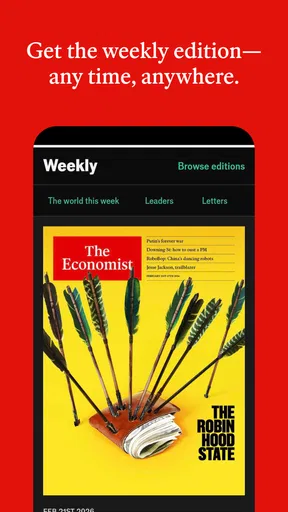
The Economist - World News app provides access to a wide range of global news articles, podcasts, and videos. Subscribers can enjoy full editions of The Economist magazine, audio versions of articles, and curated daily and weekly selections. The app also includes a personalized news feed and offline reading capabilities.
Is a subscription required to access content on The Economist app?
Yes, while the app can be downloaded for free, a subscription is required to access most content. This includes full articles, podcasts, and other premium features. However, some articles and features may be available for free to give users a taste of the content before subscribing.
How user-friendly is the interface of The Economist app?
The Economist app is designed to be intuitive and user-friendly, with a clean and organized interface. Users can easily navigate through sections, customize their news feed, and access multimedia content. The app also supports offline reading, allowing users to download articles for later consumption without an internet connection.
Can I customize notifications and alerts on The Economist app?
Yes, the app allows users to customize notifications and alerts to stay updated on the latest news and topics of interest. You can set preferences for specific sections or types of content, ensuring you receive timely updates tailored to your interests without being overwhelmed by unnecessary notifications.
Is The Economist app available for both Android and iOS devices?
Absolutely, The Economist - World News app is available on both Android and iOS platforms. This ensures that users can access their favorite news content on a wide range of devices, from smartphones to tablets, ensuring a seamless experience regardless of the operating system.


